

Student Support

On this page

Ways To Connect

What you can expect from your school

The relationship we have with you, our parents, is our top priority. Our partnership will help ensure your student is successful in and out of the classroom. Listed below are the tools your school will use to keep you up-to-date, informed and engaged in the day-to-day work of your student.  

In addition, we want to hear from you! We believe it is important to have two way communication and encourage you to reach out and let us know what you have questions about, how we can help or ideas of how to improve your experience.   

Tools your school will use to communicate

Login to TEAMS to Start Learning on Any Device

Parent Communication Flow Chart

This is a tool to help you know who to contact for the specific issue you are trying to address. We commit to a 24 hour response rate and want you to feel you are connecting with the best person to answer your questions. If you do not receive one, please reach out to the campus Academic Counselor. Here is an example of what it may look like: 
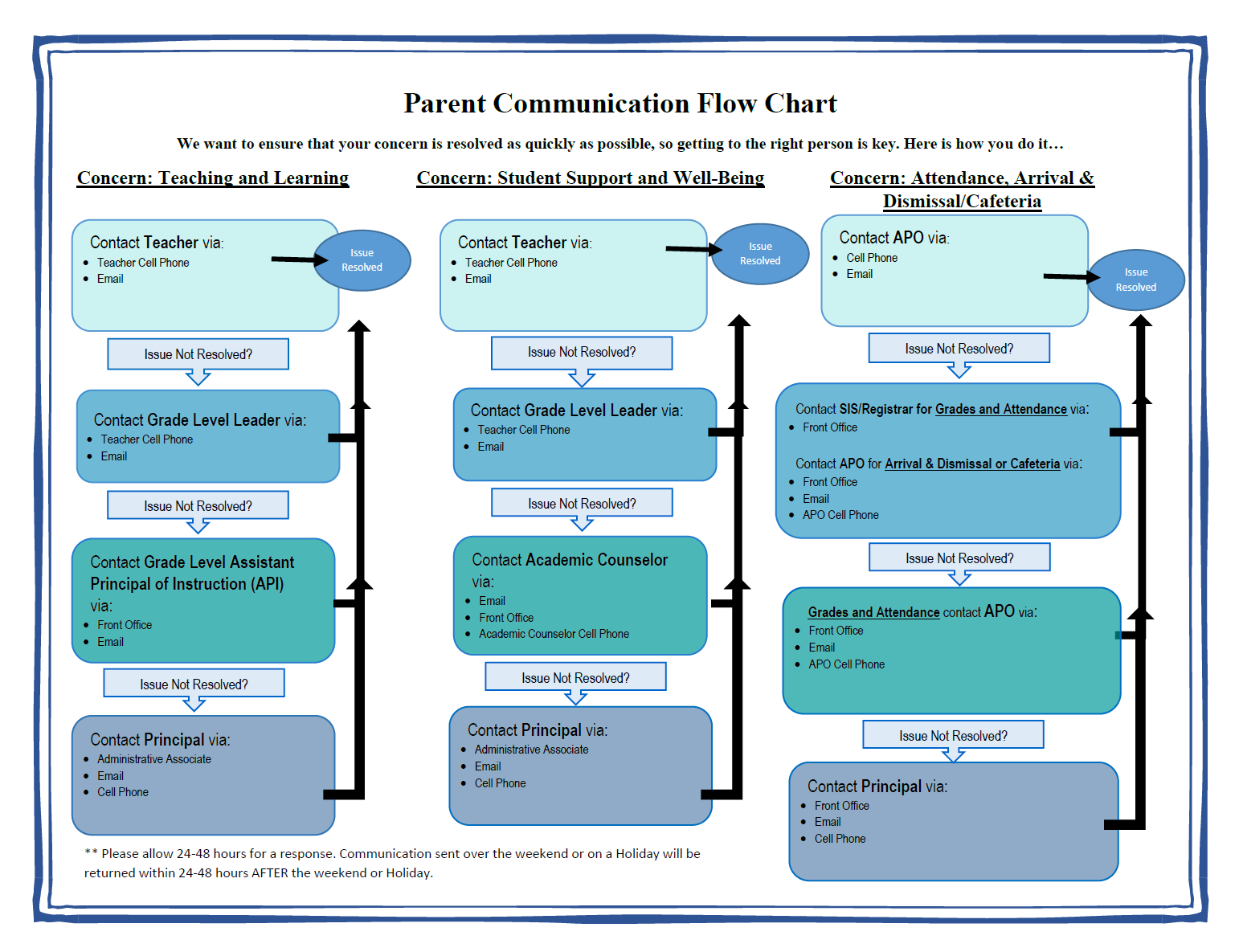
Click the image to expand! 

Remind

Remind is a communication platform that allows the school to communicate with you and for you to use to communicate with the school staff. We utilize this app between the hours of 7am-7pm. We are committed to a 24-hour response rate. Please use this app to connect with campus staff via text or phone call. Please expect to receive more information regarding Remind as we get closer to the 25-26 school year.

Family Weekly

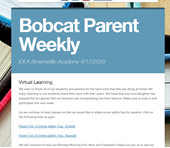
Every school will share a weekly newsletter with you called the Family Weekly. If you do not receive this, please contact the campus School Counselor. This newsletter is shared electronically via Remind. Please expect to receive a Family Weekly when the 25-26 school year begins. Here is a picture of what a Family Weekly looks like:
Social Media

Follow us on social media! To remain up-to-date on IDEA’s latest and greatest news, we encourage you to follow us on our national Facebook and Instagram pages. We also encourage you to follow your campus’ Facebook for specific campus related news and highlights.

Glossary of Terms

To help our IDEA families to get more comfortable with the IDEA culture and our frequently used terms, we have created this IDEA Glossary of Terms sheet! In no time, you will be using these terms on your campus and with your scholar!

Glossary of Terms

Texas House Bill 6

Families, as required under HB6, IDEA is sharing the changes the Texas Education Agency (TEA) has made related to School Discipline. You can access these changes here.

We will continue to support your student in all the ways we can and believe in every single one of them. For details on our policies, please refer to the Student Handbook, available at the button below. Thank you for being part of our Team and Family!

Title 1 policies

IDEA Public Schools receives federal Title I funding to help ensure that every student (no matter their background) has access to a high-quality education. Title I supports our efforts to strengthen instruction, provide additional academic resources, and engage families as active partners in their child’s learning.

As part of this program, each campus develops a School-Parent Compact and Family Engagement Policy that outline shared goals for student achievement and family involvement. Families are encouraged to review these documents and participate in meetings and events that shape how Title I funds are used at their child’s school.

For more information, please review the attached documents below in English and Spanish. 

Crisis Prevention & Response Support

Our Goal

Our vision is to ensure the physical and emotional safety of all IDEA staff and students. By providing high-quality training and professional development to team members and preventative psycho-educational lessons to students, we optimize the level of preparedness for our staff, students, and community in the event of a crisis or critical incident.

What does Crisis Prevention & Response look like at IDEA Public Schools?

At IDEA, we believe equipping campus administrators, teachers, students, and families with the skills to prevent, identify, and respond to crises and critical incidents provides campuses with the best opportunity to remain safe for all. While we can’t prevent all crises from occurring, we can ensure that when they do, everyone is aware of their role and prepared to respond using a trauma-informed approach. We also believe that effective communication with staff, students, and families is paramount. We promise to keep all stakeholders abreast whenever incidents occur, as well as provide updates and closure while we work to resolve the situation.

Take a moment to review the list of curated resources for family members to support their student(s) during vulnerable times in their lives and those close to them. Additional resources are added periodically, so be sure to visit our page regularly.

Call or text the national mental health hotline:

PBIS Rewards

Positive Behavior and Intervention Supports

Across our district, we are committed to creating safe, supportive, and positivelearning environments for every student. To help us recognize and reinforcepositive behavior consistently at all schools, we use PBIS Rewards, a digital systemthat supports the Positive Behavioral Interventions and Supports (PBIS) framework.​

PBIS is a districtwide approach focused on teaching expectations, celebratingpositive choices, and building strong, respectful school communities. PBIS Rewardshelps us make this process clear and consistent for students, families, and staff.

🌟 What PBIS Rewards Does

PBIS Rewards allows teachers and staff throughout the district to award points when students demonstrate behaviors aligned with our shared expectations—such as our core values. This helps students understand what they’re doing well and encourages positive habits across all grade levels.

📱 How Families Stay Connected

​Families can use the PBIS Rewards app to:​

- See when and why their child earns points​
- Stay informed about district behavior expectations
- ​Learn about PBIS events, activities, and supports ​
- Celebrate positive progress at home​

The app makes it easy for families to stay engaged in their child’s success.

🎉 How Students Use Their Points

​Students can use their PBIS points for a variety of district‑approved incentives, such as:​

- School or classroom rewards​
- Special privileges or recognition opportunities
- Participation in PBIS events or celebrations​

These incentives help create a positive, encouraging atmosphere that supports learning and growth districtwide.

📱 How Parents Get Connected on the PBIS Rewards App

Follow these simple steps to connect to your child’s PBIS Rewards account and stay informed about their positive behavior at school.

1. Download the PBIS Rewards Parent App
​The app is free and available on all major app stores.​​

Apple App Store (iPhone/iPad)​
Google Play Store (Android devices)​
Search for: PBIS Rewards Family App​​

2. Link Your Account to Your Child​(You will need a unique student QR code provided by your child’s school.)​​

Once you have the code:​
1. Open the app​
2. Click the plus sign to add your child
​​3.  Scan the QR code (You must scan the QR code using the scan feature in the app. Do not use your phone's camera)​​
4. Your child’s profile will appear in your app dashboard.​If you have more than one child, repeat this step for each student.​

Need Support with the PBIS Rewards App?​

  • Contact your child’s campus and connect with the PBIS Rewards Point Person or Campus Technician​
  • Contact PBIS Rewards Support at 216-260-0659

Mental Health Supports for Students and Families

Student Assistance Form:

Scan the QR code below or visit the SAF website directly: https://www.ideasaf.com/

McKinney-Vento

The McKinney-Vento Homeless Assistance Act defines homeless children and youth as individuals who lack a fixed, regular, and adequate nighttime residence. This definition includes those sharing housing due to loss or economic hardship, living in motels, hotels, or shelters, or those with a primary residence in a public or private place not designed for regular sleeping.

Key Components of the McKinney-Vento Definition: 

  • Lack of Fixed, Regular, and Adequate Nighttime Residence: This is the core of the definition. It means a child or youth doesn’t have a consistent, permanent place to sleep that is suitable for human habitation.  
  • Sharing Housing: This includes children or youth who are temporarily living with others due to loss of housing, economic hardship, or other similar reasons.  
  • Living in Temporary or Emergency Housing: This includes shelters, transitional housing, motels, hotels, trailer parks, or campgrounds due to a lack of alternative, adequate accommodations.  
  • Living in Public or Private Places Not Designed for Sleeping: This encompasses situations like cars, parks, abandoned buildings, bus or train stations, and similar settings. 

Resources:


Contact your campus School Counselor, Social Worker, or Principal for questions or support. 

First Day Picture Printables

It’s almost the First Day of School and to make sure you’re ready to take your annual first day of school photograph, we’ve created printables for your use!

All you need to do is print the grade level your child is entering this year and snap your photo! We encourage you to share your photos on social media on your child’s first day, with the hashtag #IDEABack2School.

We look forward to seeing thousands of photos on Facebook, Instagram, and Twitter!